\begin{title}\format[HTMLChars]{\title}. \end{title}
\begin{type}\format[HTMLChars]{\type}\end{type}
\begin{datum} vom \format[HTMLChars]{\datum}\end{datum}
\begin{ref_numb} - \format[HTMLChars]{\ref_numb}\end{ref_numb}
\begin{journal} In: \format[HTMLChars]{\journal}, \end{journal}
\begin{volume}Jg. \format[HTMLChars]{\volume}, \end{volume}
\begin{number}Hf. \format[HTMLChars]{\number}, \end{number}
\begin{pages}S. \format[HTMLChars,FormatPagesForHTML]{\pages}\end{pages}
Inhalt:
\begin{abstract}\format[HTMLChars]{\abstract} \end{abstract}
Instanzen:
\begin{instanzen}\format[HTMLChars]{\instanzen} \end{instanzen}
```
I have no experience in HMTL… Can someone please help me?
Beste regards
geophil
---
### Author:  [@Siedlerchr](https://discourse.jabref.org/u/Siedlerchr)
#### Post date: [May 19, 2022, 6:06pm UTC](https://discourse.jabref.org/t/set-entry-preview/3393/2 "2022-05-19T18:06:39Z")
Hi,
if you want to have a newline in html you need to enter a `
` tag
`Text` is for bold text and
Viele Grüße
---
### Author:  [@geophil](https://discourse.jabref.org/u/geophil)
#### Post date: [May 19, 2022, 8:31pm UTC](https://discourse.jabref.org/t/set-entry-preview/3393/3 "2022-05-19T20:31:26Z")
Thank you for your answer
I’m Not a HTML Profi, but …I think
`
` i can use in the entry preview between two different fields Like `` `
` ``.
I’ve created a new field ‘instanzen’. The Text in this field contains in short the judgment of two different courts, Like ‘VGH\_1, VGH\_2.’ So, my wish, the entries should be in two lines and not in one line in a row.
it also works for the standard field ‘abstract’. The input is accepted one to one.
Thats all i want for my created field ‘instanzen’
Best regards geophil
---
<div class="post-metadata">
### Author:  [@geophil](https://discourse.jabref.org/u/geophil)
#### Post date: [May 20, 2022, 9:10am UTC](https://discourse.jabref.org/t/set-entry-preview/3393/4 "2022-05-20T09:10:49Z")
</div>
So, with copy and paste the result of the entry preview corresponds to my ideas. But. So that the different instances in the courts are presented in two lines and not in one line, I have created two fields in the entry editor and not one. When entering it, it is of course not so nice that this is entered in two fields. It would make sense if only one field is used for this and in the entry preview the different instances are automatically displayed below.
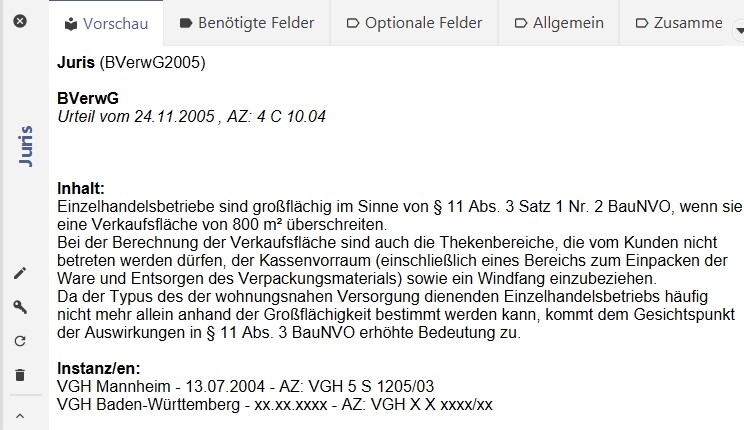
Like this in my entry preview:
```auto
<font face="sans-serif"><b>\bibtextype</b><a name="\citationkey">\begin{citationkey} (\citationkey)</a>\end{citationkey}
\begin{author}<BR><BR><b>\format[Authors(LastFirst, FullName,Sep= / ,LastSep= / ),HTMLChars]{\author}</b>\end{author}
\begin{editor & !author}<BR><BR><b>\format[Authors(LastFirst,FullName,Sep= / ,LastSep= / ),HTMLChars]{\editor} (\format[IfPlural(Eds.,Ed.)]{\editor})</b>\end{editor & !author}
\begin{title}<BR><i>\format[HTMLChars]{\title}</i> \end{title}
\begin{type}<BR><i>\format[HTMLChars]{\type} \end{type}
\begin{Datum} vom \format[HTMLChars]{\Datum} \end{Datum}
\begin{ref_numb}, AZ: \format[HTMLChars]{\ref_numb} \end{ref_numb}</i>
<BR>\begin{edition}, \edition. edition\end{edition}
\begin{editor & author}<BR><BR>\format[Authors(LastFirst,FullName,Sep= / ,LastSep= / ),HTMLChars]{\editor} (\format[IfPlural(Eds.,Ed.)]{\editor})\end{editor & author}
\begin{booktitle}<BR><i>\format[HTMLChars]{\booktitle}</i>\end{booktitle}
\begin{chapter} \format[HTMLChars]{\chapter}<BR>\end{chapter}\begin{editor & !author}<BR>\end{editor & !author}\begin{!editor}<BR>\end{!editor}\begin{journal}<BR><i>\format[HTMLChars]{\journal}</i> \end{journal} \begin{volume}, Jg. \volume\end{volume}\begin{series}<BR>\format[HTMLChars]{\series}\end{series}\begin{number}, Hf. \format[HTMLChars]{\number}\end{number}\begin{pages}, S. \format[FormatPagesForHTML]{\pages}\end{pages}
\begin{school} \format[HTMLChars]{\school}, \end{school}
\begin{institution} <em>\format[HTMLChars]{\institution}, </em>\end{institution}
\begin{abstract}<BR><BR><b>Inhalt: </b><br>\format[HTMLChars]{\abstract} \end{abstract}
\begin{instanz_1}<BR><BR><b>Instanz/en: </b><br>\format[HTMLChars]{\instanz_1} \end{instanz_1}<br>
\begin{instanz_2}\format[HTMLChars]{\instanz_2} \end{instanz_2}<br>
\begin{owncitation}<BR><BR><b>Own citation: </b>\format[HTMLChars]{\owncitation} \end{owncitation}
\begin{comment}<BR><BR><b>Comment: </b>\format[HTMLChars]{\comment}\end{comment}
</font>
```
---
<div class="post-metadata">
### Author:  [@geophil](https://discourse.jabref.org/u/geophil)
#### Post date: [May 20, 2022, 9:11am UTC](https://discourse.jabref.org/t/set-entry-preview/3393/5 "2022-05-20T09:11:25Z")
</div>
but not like this in my entry editor:

Is there a solution for this?
greeting & thanks
---
<div class="post-metadata">
### Author:  [@Siedlerchr](https://discourse.jabref.org/u/Siedlerchr)
#### Post date: [May 21, 2022, 5:54pm UTC](https://discourse.jabref.org/t/set-entry-preview/3393/6 "2022-05-21T17:54:51Z")
</div>
Hi, yes there is a kind of hacky solution: You can define a field to be multiline by adding it in the Preferences → File → Saving → Do not wrap the following fields when saving: Add your custom field(s) you want to have as multiline. Separator is a semicolon.
Despite the name it’s also reflected in the entry editor and therefore should behave like abstract or comment in the entry preview:
---
<div class="post-metadata">
### Author:  [@geophil](https://discourse.jabref.org/u/geophil)
#### Post date: [May 22, 2022, 9:29am UTC](https://discourse.jabref.org/t/set-entry-preview/3393/7 "2022-05-22T09:29:28Z")
</div>
Thank you very much, I could only understand this when I changed the language from German to English. Then it was very simple. The problem was that I understood this field completely differently in German: “Beim Speichern keinen Zeilenumbruch in den folgenden Feldern einfügen = Do not insert a line break in the following fields when saving”.
Greetings geophil
---
<div class="post-metadata">
### Author:  [@Siedlerchr](https://discourse.jabref.org/u/Siedlerchr)
#### Post date: [May 22, 2022, 11:41am UTC](https://discourse.jabref.org/t/set-entry-preview/3393/8 "2022-05-22T11:41:07Z")
</div>
Hi,
yes, the translation is more or less correct, but confusing. Ieally the feature should be available in the Custom Entry types dialog: [Create a better solution for defining multiline fields · Issue #6448 · JabRef/jabref · GitHub](https://github.com/JabRef/jabref/issues/6448)
The translation of JabRef is managed at CrowdIn: If you think you have a better translation, feel free to edit it.
> **[JabRef — Translation Project on Crowdin](https://crowdin.com/project/jabref)**
>
> Help us translate JabRef and bring it to the world!
Viele Grüße aus Paderborn
Christoph
---
<div class="post-metadata">
### Author:  [@geophil](https://discourse.jabref.org/u/geophil)
#### Post date: [May 23, 2022, 9:28am UTC](https://discourse.jabref.org/t/set-entry-preview/3393/9 "2022-05-23T09:28:46Z")
</div>
Hello, It is not completely clear to me what is meant by “Do not wrap the following fields when saving”:
- line break yes/no
- flowing text yes/no
- … yes/no
Total: which “feature **s** ” are enabled or disabled. That’s why it’s hard for me to create another translation. However, I think the suggestion to be able to make this setting directly for the entry types is great.
p.s. Sorry for my Google translation English
Grüße aus Bremen
André